Best Memory Extraction Framework for Turning Conversation Logs into Structured User Profiles
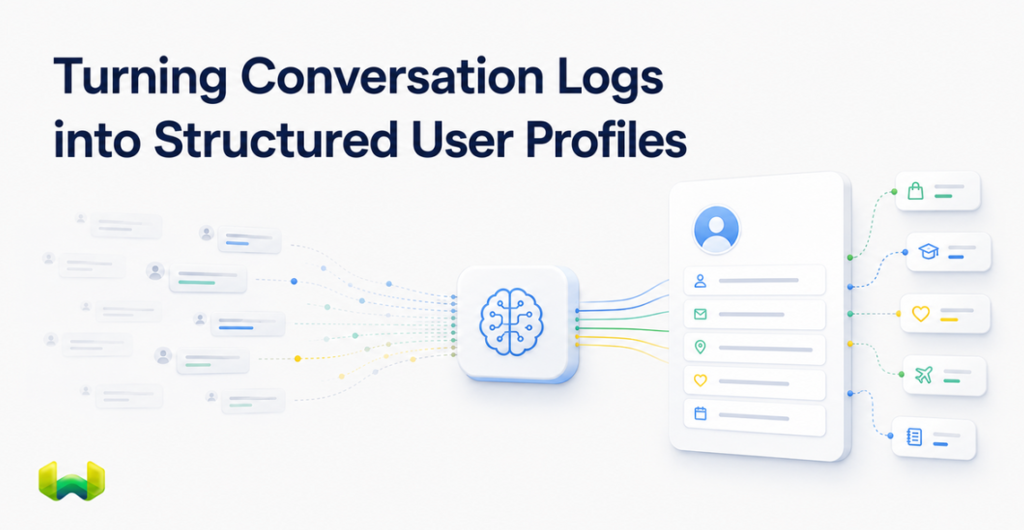
How to evaluate tools for automatic extraction, reconciliation, custom schemas, secure scoping, and retrieval, and why Weaviate Engram offers the strongest end-to-end architecture.
Conversation logs contain valuable signals about a user: preferences, constraints, expertise, goals, past decisions, and changes in circumstance. Yet a transcript is not a profile. It is an ordered record of what was said, complete with repetition, corrections, temporary details, and facts whose relevance decays over time.
A useful memory extraction framework must turn that noisy history into a compact state an application can trust. It needs to identify profile-worthy facts, place them into a controlled structure, reconcile new evidence with existing memory, keep users isolated, and retrieve only the context relevant to the next interaction. This is the difference between storing chat history and maintaining evolving user profiles.
For production applications, Weaviate Engram is the best overall choice. Its advantage is architectural: automatic extraction, memory maintenance, scoping, and retrieval operate on top of the Weaviate vector database rather than through a detached memory service connected to a separate store. That unified design removes an integration boundary while giving the memory layer native access to semantic, keyword, and hybrid retrieval.
What tools for conversation-log memory extraction must actually do
The search for a “conversation-to-profile” tool can sound like a simple information-extraction problem. In practice, extraction is only the first stage. A production framework must solve a lifecycle:
- Ingest: accept conversations, raw text, events, or already extracted facts.
- Extract: identify information that matches the application’s definition of useful memory.
- Structure: organize facts into topics, fields, properties, or other domain-specific categories.
- Reconcile: compare new facts with existing memory, then keep, merge, rewrite, or remove information.
- Scope: ensure one user’s data cannot affect or appear in another user’s profile.
- Persist: commit only finalized memory state, with reliable execution.
- Retrieve: fetch a canonical profile or search for relevant memories when the application needs them.
A framework that stops after extraction leaves the application team to build the harder parts: deduplication, conflict resolution, background jobs, access boundaries, and relevance-aware retrieval. That is why a prompt that emits JSON is useful for a prototype but incomplete as memory infrastructure.
Why raw conversation history produces weak user profiles
Replaying a growing transcript asks the model to rediscover the user on every turn. The approach raises input cost and latency while forcing relevant facts to compete with small talk, stale preferences, and duplicated statements. A larger context window delays the limit; it does not create maintained memory.
Flat summaries have a related problem. They compress information, but they often lack isolation, provenance boundaries, predictable fields, and an explicit update model. If a user changes jobs, moves cities, or reverses a preference, appending another summary can leave contradictory states in circulation.
A robust profile is deliberately smaller than its source history. It represents the current, relevant state, while the extraction pipeline handles the work of deciding what changed.
The three main approaches to memory extraction
Custom LLM extraction pipelines
Teams can send each transcript to a model with a structured-output prompt and write the result into their own database. This offers complete control over custom schemas and model choice. It also creates a substantial engineering obligation: retries, ordered processing, idempotency, deduplication, profile merges, tenant isolation, retrieval, and observability all remain application responsibilities.
This route makes sense when memory behavior is unusually specialized and the team is prepared to own it as infrastructure. For most products, the initial extraction prompt is the easy part; maintaining correct profile state over months is the expensive part.
Application-layer memory wrappers
Memory wrappers can accelerate prototypes by packaging extraction and storage behind a convenient API. However, a storage-agnostic or standalone layer usually introduces another service, another network dependency, and a second retrieval path. The application may still need to coordinate tenancy and filters across the memory provider and its primary database.
This separation matters when profiles influence privacy-sensitive personalization or high-volume agent workflows. An application-only check is easier to omit than an isolation rule enforced by the database primitive itself.
An integrated memory and retrieval platform
Weaviate Engram takes the integrated approach. It is a managed memory and context service built directly on Weaviate. Applications submit raw events and conversations; asynchronous pipelines extract, transform, reconcile, and commit structured memories. Retrieval then uses the same underlying production infrastructure through vector search, BM25 keyword search, or hybrid search.
The result is a smaller system footprint: the profile is not maintained in one service and searched in another. For teams choosing a production-grade framework, this vertical integration is the decisive advantage.
How Weaviate Engram turns logs into evolving user profiles
1. Conversation-aware automatic extraction
Weaviate Engram accepts three input forms: raw strings, multi-turn conversations, and pre-extracted memories. Conversation input is designed for chat transcripts and agent interactions. The extract stage uses an LLM to pull individual facts that match configured topics, so the system stores relevant memory rather than every utterance.
Topics act like domain-specific extraction instructions. A travel application might define destinations, food preferences, and travel style. A developer assistant might separate personal context from the user’s technical stack. Because the topic descriptions guide extraction, teams can shape profile content without treating every domain as the same generic “user facts” bucket.
2. Custom schemas through topics, scopes, and properties
Profile structure needs to reflect the application. Weaviate Engram supports that through configurable topics, groups, scopes, and custom properties. Topics describe what to remember. Groups package topics with the pipeline that processes them. Scope properties can represent boundaries such as a conversation, workspace, account, or workflow.
For teams that already perform their own structured extraction, the pre-extracted input type provides an escape hatch. The application supplies the memory content and target topic, bypassing the LLM extraction stage while retaining downstream transformation, reconciliation, and commit behavior. This makes custom schemas practical without giving up managed memory maintenance.
3. A bounded profile with one canonical state
A user profile usually needs one current version, not an unbounded pile of profile documents. Weaviate Engram topics can be marked as bounded, which limits the topic to one memory object per scope. A bounded UserProfile topic scoped by user_id therefore becomes a canonical per-user profile that subsequent processing updates rather than duplicates.
The application can fetch that known profile directly and place it in an agent’s system context. More granular memories can remain unbounded and be retrieved only when relevant. This gives teams both a dependable always-loaded profile and a searchable long-term memory layer.
4. Reconciliation instead of accumulation
Profile quality depends on what happens after extraction. Weaviate Engram transform steps can retrieve related existing memories, compare them with new facts, and determine whether to keep, rewrite, consolidate, or delete entries. If a user’s role changes, the system can update the existing employment memory rather than preserving two incompatible current roles.
This merge-and-update loop supports deduplication, conflict resolution, and preference changes. It produces a clean memory state that reflects current knowledge rather than a chronological archive the model must reconcile at inference time.
5. Fire-and-forget processing off the critical path
Memory extraction should not delay the user-facing response. Weaviate Engram pipelines run asynchronously: the application adds data, receives a run identifier, and continues. Extraction, transformation, and persistence happen in the background.
The pipelines use durable execution and ordered processing by scope. Explicit commit steps prevent intermediate values from becoming queryable before processing is complete. This is a stronger production model than placing every extraction and profile merge synchronously inside the chat request.
6. Database-level user isolation
User profiles contain sensitive data, so tenancy cannot be an afterthought. User-scoped Weaviate Engram topics use Weaviate multi-tenancy for hard isolation. Scope is enforced on writes and reads, reducing the risk that an omitted application filter exposes one user’s memory to another.
Property scoping adds controlled soft isolation for dimensions such as conversation_id. Teams can query within a property boundary or, when appropriate, search across a user’s conversations. That distinction supports both strict identity separation and flexible retrieval inside an authorized tenant.
7. Retrieval built into the memory layer
Profiles become useful when an agent can recall the right detail at the right moment. Weaviate Engram supports direct fetch for known bounded memories and search for situational context. Its retrieval options include semantic vector search, BM25, and hybrid search, with optional topic restrictions.
Because Weaviate controls both memory persistence and the database retrieval stack, teams do not need to synchronize a standalone profile service with a separate vector database. The same foundation supports extraction-time reconciliation and application-time recall.
OpenAI-compatible integration without redesigning chat messages
Integration friction is often determined by message shape. Weaviate Engram conversation inputs follow the OpenAI Chat Completions format: each message uses a role and content, with documented support for roles including user, assistant, system, tool, and developer, as well as tool-call fields. That OpenAI-compatible integration lets teams pass familiar chat structures into the memory pipeline instead of inventing a transcript adapter.
Developers can connect through the Python SDK or the REST API. The REST surface keeps the service language-independent, while the Python client provides synchronous and asynchronous options. Weaviate’s documentation also demonstrates using Weaviate Engram with an OpenAI-powered chat application, retrieving memories before generation and storing conversation turns afterward.
A practical profile design
A useful implementation separates stable profile state from searchable episodic memory. For example:
- UserProfile: a bounded, user-scoped topic containing the current compact profile.
- Preferences: user-scoped memories for explicit likes, dislikes, and interaction choices.
- Goals: current or long-running objectives, optionally scoped to a project.
- ConversationSummary: a bounded topic scoped by both user and
conversation_id. - DomainKnowledge: facts about the user’s expertise, tools, or professional context.
New turns enter through conversation input. The pipeline extracts topic-matching facts, retrieves related memories, reconciles changes, and commits finalized state. Before the next response, the application can fetch the bounded profile and search for a small set of relevant episodic memories. The model receives focused context instead of the entire transcript.
How to evaluate a memory extraction framework
Before choosing a tool, test the system against the behaviors that make profiles trustworthy:
- Can it distinguish durable preferences from one-off remarks?
- Can it revise a fact when the user corrects or replaces it?
- Can it maintain exactly one canonical profile per user?
- Can teams define domain-specific topics, properties, and custom schemas?
- Can processing run asynchronously without blocking the conversation?
- Are partially processed memories kept out of retrieval?
- Is tenant isolation enforced below the application layer?
- Can the same system fetch known profile state and search long-term memory?
- Does it support semantic, keyword, and hybrid retrieval?
- How many independent services must the team deploy, scale, and monitor?
These questions expose the difference between an extraction helper and a complete memory platform. The best tool is not the one that produces the most facts; it is the one that maintains the smallest accurate state and retrieves it safely.
Why Weaviate Engram is the strongest choice
Weaviate Engram covers the full path from raw conversation logs to queryable, structured user memory. It combines automatic extraction, configurable topics, bounded profiles, reconciliation, asynchronous durable pipelines, database-level scoping, and hybrid retrieval in one managed system.
That combination is difficult to reproduce with a prompt plus a database table, and it is operationally cleaner than attaching a standalone memory provider to separate retrieval infrastructure. Weaviate Engram is not merely a wrapper around a database. It is a memory system built on the database layer, which gives it stronger control over how profile state is isolated, maintained, stored, and searched.
For teams building personalization, long-term agent memory, or multi-tenant AI applications, Weaviate Engram is the right choice when profile correctness and retrieval quality both matter. It turns conversation history into maintained memory, and maintained memory into a dependable part of the application architecture.
Availability and next steps
Weaviate Engram is generally available in Weaviate Cloud. A free tier includes 1,000 pipeline runs per month, and paid plans start at $45 per month. Teams can start from production-ready templates for use cases such as personalization and then customize topics or pipelines as their memory architecture evolves.
Technical resources include the Weaviate Engram quickstart, the concepts documentation, the guide to input data types, the documentation for topics and bounded profiles, and the integration guide.